Coloring that feels less like filling boxes
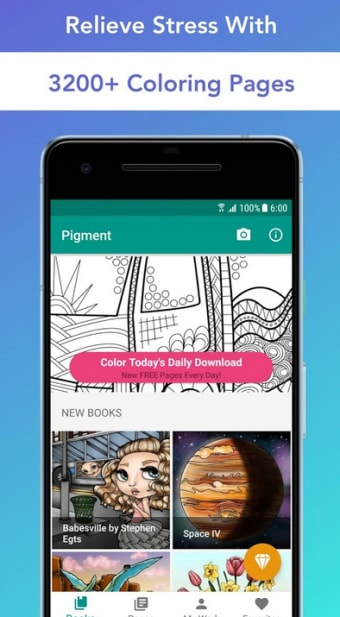
Pigment, developed by Pixite LLC, is a digital coloring app built for relaxed, hands-on creativity. It offers manual coloring, tap-to-fill tools, photo import, and detailed color controls for shading and gradients. The app pairs curated artwork with customizable palettes and editing options, making it useful for adults, casual colorists, and hobbyist artists who want a calmer creative routine without opening a full drawing suite.
Top Recommended Alternative
Brushes with a little real-world bite
Pigment provides 30+ brushes and fills that emulate pencils, markers, paintbrushes, airbrushes, and texture tools for varied marks and tonal control. Tool behavior supports pressure-sensitive input on compatible styluses, adjusting stroke feel for more precise coloring. Blending, shading, and custom gradient options also help users create smoother transitions, while the free experience gives only part of the broader brush, palette, and artwork library.
Tap, stroke, save, breathe
Workflows range from deliberate stroke-based coloring to quicker region-based tap-to-fill. Users can import personal photos or drawings and turn them into custom coloring pages for more personal projects. Once a page is downloaded, it can be edited offline, then saved to the device gallery for sharing or printing. These options support quick creative breaks as well as longer, detail-focused sessions without extra software.
Stylus fans get the sharper crayons
The mobile app works across phones and tablets, with feature availability and performance shaped by the device in use. Pigment is tuned for pressure-sensitive styluses such as the S-Pen, giving users finer control on compatible hardware. Pixite also updates the app with themed collections and artist-contributed artwork, although full access to the larger library and premium tools requires a Premium subscription.
A pocket art break, not art therapy
Pigment fits short breaks, quiet evenings, and longer coloring sessions built around low-pressure creativity. Its tactile-style tools encourage practice with color mixing and shading, while offline access to downloaded pages makes it convenient away from a connection. It works best for users who want a relaxing digital coloring book, not a complete illustration app or a guaranteed wellness solution.